Most successful scams do not start with a technical exploit. They start with an unexpected message, a convincing page, a pop-up, or a phone call that catches someone off guard and asks them to do something.
This guide is about that moment.
It is written for small-business owners and staff, including non-technical employees. The same patterns apply to personal scams, and we use consumer examples where they illustrate the mechanic more clearly. The threat ordering reflects what puts a business at the greatest financial risk. Some examples and reporting resources are Canadian, but these are global problems.
It covers the unexpected contact: emails, texts, pop-ups, QR codes, web pages, and phone calls that arrive without you asking, and that want you to click, log in, pay, approve, install, or share information. It does not cover support sessions you deliberately started by calling a known help desk, or vendors you contacted yourself.
If the contact came to you first, treat it with caution until you have verified it.
Stop. Do not click, run, pay, or approve anything. Close the message or page. Then find the organization's phone number or website yourself. Do not use the contact details the suspicious message provided.
Nothing in this guide requires technical knowledge. It only requires one habit: pause before you act.
Quick filters
Before you click, reply, scan, log in, install, or pay, run through these questions:
- Was I expecting this?
- Is there pressure, urgency, or a threat?
- Am I being asked to click a link, open an attachment, scan a QR code, run a command, approve a login, or send money?
- Does the actual email address or website address match exactly what I expect?
- Did I get here from a trusted source, or through a message I do not trust?
- Is this request unusual for this person or organization?
- Have I verified it through a different channel I already trust?
If any answer gives you pause, stop and verify independently.
The question that matters has changed
For years, people were told to look for spelling errors, blurry logos, or awkward wording. That advice is not useless, but it is no longer enough.
Scammers now use AI tools to write polished messages, copy real branding, and personalize attacks with information lifted from websites, social media, and leaked data. Some can clone a familiar voice from a few seconds of audio. A scam can look professional and still be fraudulent.
The better question is no longer, "Does this look real?"
Is this a suspicious request?
A suspicious request usually has one or more of these traits:
- It arrived without you initiating the contact.
- It creates pressure to act quickly.
- It asks you to click, run, pay, log in, install, or approve something.
- It warns of consequences if you do nothing.
- It asks for secrecy, unusual payment methods, or workarounds to normal process.
When you evaluate the request instead of the appearance, scams get much easier to spot.
One thing to keep in mind as you read
The threats in this guide are ordered by how much money they can cost a business. That order is not the same as how the attacks land. Many of the biggest financial losses start with an attack that looks smaller on its own: a password stolen through a fake login page, a device infected by a pasted command, an approval tap on a notification. The top attacks on the list are usually reached through the middle of the list. Understanding both is the point.
Foundations: how to inspect what you see
The skills below apply to nearly every threat in this guide. Learn them once and you will recognize the signals everywhere else.
How to check who sent an email
Display names are trivial to fake. Anyone can put "Microsoft Support" or your CEO's name in the sender field. The full email address, especially the part after the @ symbol, is a useful clue, but it is not proof. Attackers can use lookalike domains, spoof weakly protected domains, or send real email from accounts they have compromised. Treat the address as evidence, not a guarantee. If the message involves money, passwords, or urgency, verify it through a channel you already trust.
On most devices, tap or click the sender's name to reveal the full address.
- Lookalike domains that are close but not right:
paypa1.cominstead ofpaypal.com,amaz0n.cainstead ofamazon.ca,microsft-helpdesk.infoinstead ofmicrosoft.com. - Legitimate company names paired with free email services. A real bank will not email you from a
@gmail.comaddress. - Generic display names like "Accounting," "IT Department," or "Support" paired with unfamiliar addresses.

If a domain looks almost right, stop and check it before you engage. Paste the full link, sender email, or domain into Treo's domain safety checker for a quick risk read.
How to check a website address
The address bar is the most important part of any web page. It is also the hardest thing for a scammer to fake. Scammers can copy every pixel of a real site. They cannot make a fake domain become the real one.
Read the bar carefully. The real domain is the last name.extension pair before the first single slash. Everything to the left of that is either a subdomain, which the real owner controls (like mail in mail.google.com), or padding a scammer added to fool you.
- Misspellings:
facebok.com,microsfot.com. - Extra words around a brand name:
paypal-secure-login.com,scotiabankonline-verify.ca. - Domains that bury the real brand inside a longer fake one:
yourbank.com.verify-login.xyzis not your bank. The real domain there isverify-login.xyz. - Unusual domain extensions.
.xyz,.top,.info, and similar are not automatically bad, but scammers lean on them heavily.

name.extension pair before the first single slash.What the padlock actually tells you
Browsers show a padlock when the connection between you and the site is encrypted. That is all it means. Encrypted does not mean trustworthy. A scam site can have a padlock; a real site should.
No padlock is a problem. A padlock by itself proves nothing about the business behind the site.
How to check where a link goes
Before you click a link, preview where it actually leads.
- On a computer, hover your mouse over the link without clicking. The real destination appears at the bottom of the browser or in a small tooltip.
- On a phone, press and hold the link. A preview will show the destination.
- Be especially careful with shortened links like
bit.lyortinyurl.com. You cannot see where they go. - Text that says
www.bankofamerica.comcan point anywhere. Only the preview tells you the truth.
How to recognize pressure, urgency, and secrecy
Urgency is the single most common ingredient in a scam. Attackers use it to stop you from thinking. Real senders rarely need you to act within ten minutes, and real emergencies usually do not arrive as vague messages.
- "Your account will be suspended today."
- "Payment required immediately to avoid legal action."
- "Approve this login now."
- "Do not tell anyone about this yet."
- "Respond in the next ten minutes."
Pressure is not proof on its own, but it is a strong warning sign. When something tries to rush you, that feeling of pressure is itself the signal.
How to recognize an unusual request
Be highly suspicious of any message or page asking you to:
- Buy gift cards
- Wire money or change bank details without the normal verification process
- Share your password
- Share a multi-factor authentication (MFA) code
- Approve a login you did not initiate
- Install software, a browser extension, or a mobile profile you did not seek out
- Enable macros or "enable content" in a document
- Open Terminal, Command Prompt, PowerShell, or the Run dialog and paste in a command
Legitimate organizations do not need shortcuts around common sense.
Threats to know, in order of financial impact
The sections below are ordered by how much money the attack can cost when it succeeds. Start at the top. Read as far as you need, but know that the smaller-looking attacks later in the list often lead to the bigger ones at the top.
-
Business Email Compromise (BEC)
The highest-cost category of fraud targeting small businesses.
Business Email Compromise is the highest-cost category of fraud targeting small businesses. It refers to any attack that gets your business to send money, redirect payments, or change banking information based on a fraudulent email.
Common variants- Executive impersonation. An email that looks like it is from your CEO or owner asks someone in finance to wire money or buy gift cards, usually framed as a confidential deal or an urgent favor.
- Vendor bank-change fraud. An email that looks like it is from a known supplier says their banking details have changed. The next invoice payment goes to the attacker.
- Invoice fraud. A fake invoice is sent with the attacker's payment details, often styled to look like a vendor you already use.
- Payroll diversion. An email that appears to come from an employee asks HR to change the bank account for their direct deposit.
Why it costs so muchThere is no malware involved. No device to infect, no login to steal, no software to block. The entire attack is a convincing message and a misdirected payment. A single successful incident can move tens or hundreds of thousands of dollars out of a business in a day.
SignalsThe request involves money or banking details. The email looks like it is from a person who already has authority to request it. There is pressure to act quickly or to keep the request quiet. The sender may have slight differences in their email address, or the conversation may come through a reply chain that was forwarded from a compromised account.
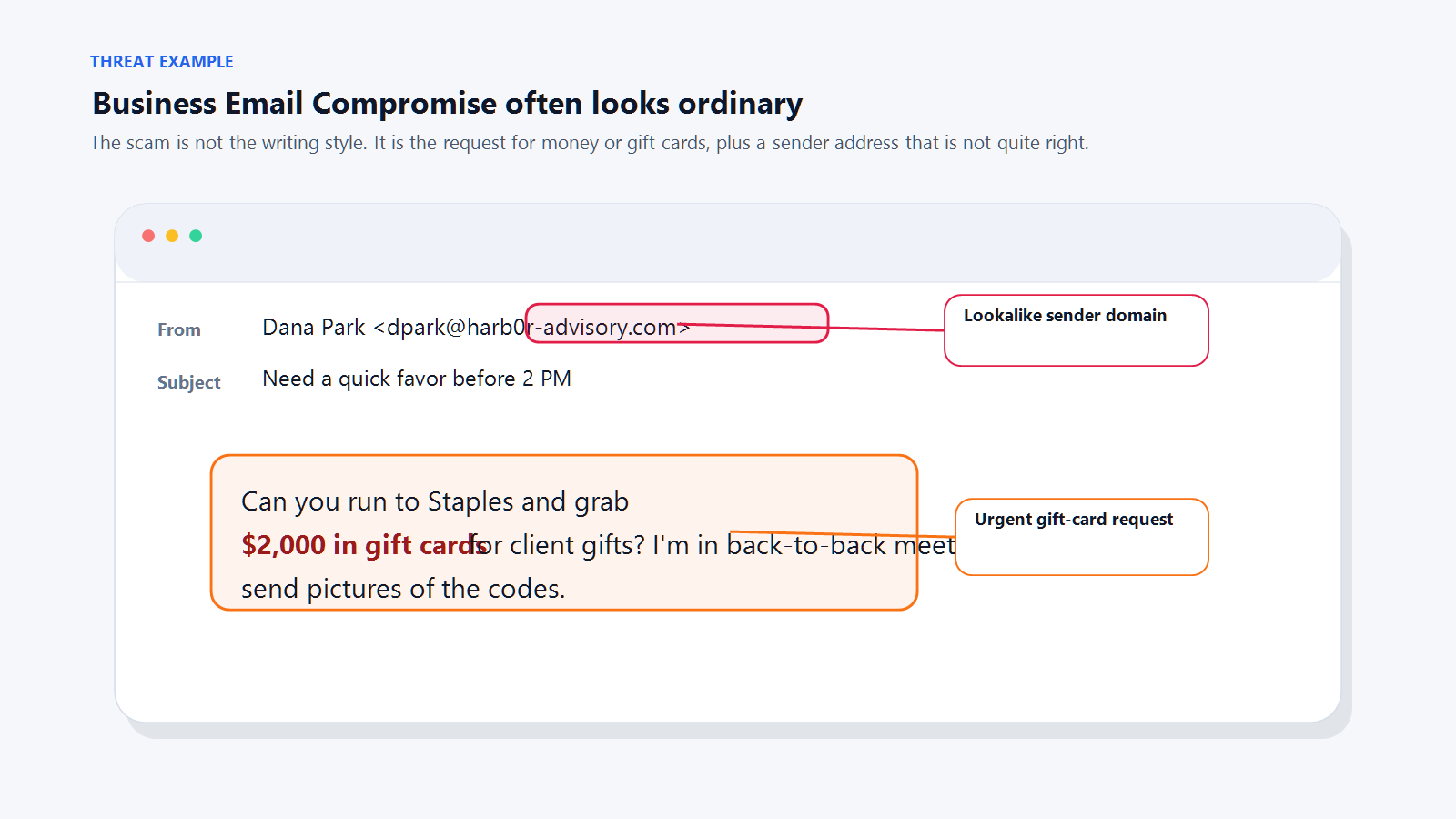
A typical executive-impersonation BEC message. The pressure, secrecy, and payment request together are the signal. Safe defaultAny request involving money, banking details, or gift cards gets verified over the phone before any action is taken, using a number you already have on file. Not the number in the email. Not a reply to the email. Make this rule policy, not preference.
-
AI voice deepfakes
A phone call from someone who sounds exactly like the person you trust.
Voice-cloning tools can produce a convincing imitation of a specific person from a few seconds of publicly available audio. That audio does not have to come from anywhere dramatic. A podcast appearance, a video on social media, a voicemail greeting, or a webinar recording is enough.
Two main patterns- Business variant. A finance or operations employee receives a phone call from someone who sounds exactly like their CEO, CFO, or a trusted client. The caller describes an urgent situation, often involving a confidential deal, and asks for a wire transfer or a banking change.
- Consumer variant. An individual receives a call from someone who sounds exactly like a family member in distress, often claiming an accident, arrest, or medical emergency. The caller asks for money sent through an untraceable method like crypto, gift cards, or a wire.
Why it costs so muchVoice has always been a trust shortcut. When someone sounds like a person you know, your first instinct is to help. The attack bypasses logic and goes straight to emotion.
What it sounds like"I'm boarding in five minutes and I can't talk long. I need you to wire $47,000 to the account I'm about to send you, before 3 p.m. today. The deal is still confidential, so keep this between us until the announcement goes out tomorrow."
SignalsThe call is unexpected. The caller is in a hurry. The caller asks for secrecy ("do not tell anyone"). The requested payment method is unusual or untraceable. Any push-back on verifying the caller ("no time," "I am about to lose signal," "please just do this for me") is itself a signal.
Safe defaults- A genuine caller in a real emergency will accept, "I am going to call you back on the number I already have saved." A scammer will resist that.
- For a business, treat any phone request for money, wire instructions, or banking changes the same way you treat an emailed one. Verify in writing through a channel you control. Make this policy, not preference.
- For families, agree on a safe word in advance. Something memorable that would never be posted online. If the caller cannot produce the word, hang up.
-
ClickFix / paste-a-command
The fastest-growing initial-access technique of the last two years.
ClickFix is the fastest-growing initial-access technique of the last two years. It has mostly replaced the "download this file" approach for a simple reason: downloads get caught by security software. A command you paste in yourself usually does not.
How it worksA web page claims something has gone wrong. A browser update is needed. A document failed to load. Your system needs to be "synced," "repaired," or "verified." The page shows you a line of text, asks you to press Windows+R (or open Terminal on a Mac), paste the line, and press Enter.
The pasted command does the actual damage. It downloads and runs malware, steals credentials, drops ransomware, or opens a connection that the attacker can use later.
Why it costs so muchClickFix is often the first step in a ransomware incident. Ransomware events at small businesses typically cost tens of thousands of dollars at a minimum, before factoring in downtime, data loss, and recovery.
SignalsAny web page, pop-up, or CAPTCHA that asks you to:
- Press Windows+R, or Command+Space, or Command+Option+Escape
- Open Terminal, PowerShell, Command Prompt, or the Run dialog
- Copy a command and paste it somewhere
- Perform any "manual fix" that uses something other than a button on the page
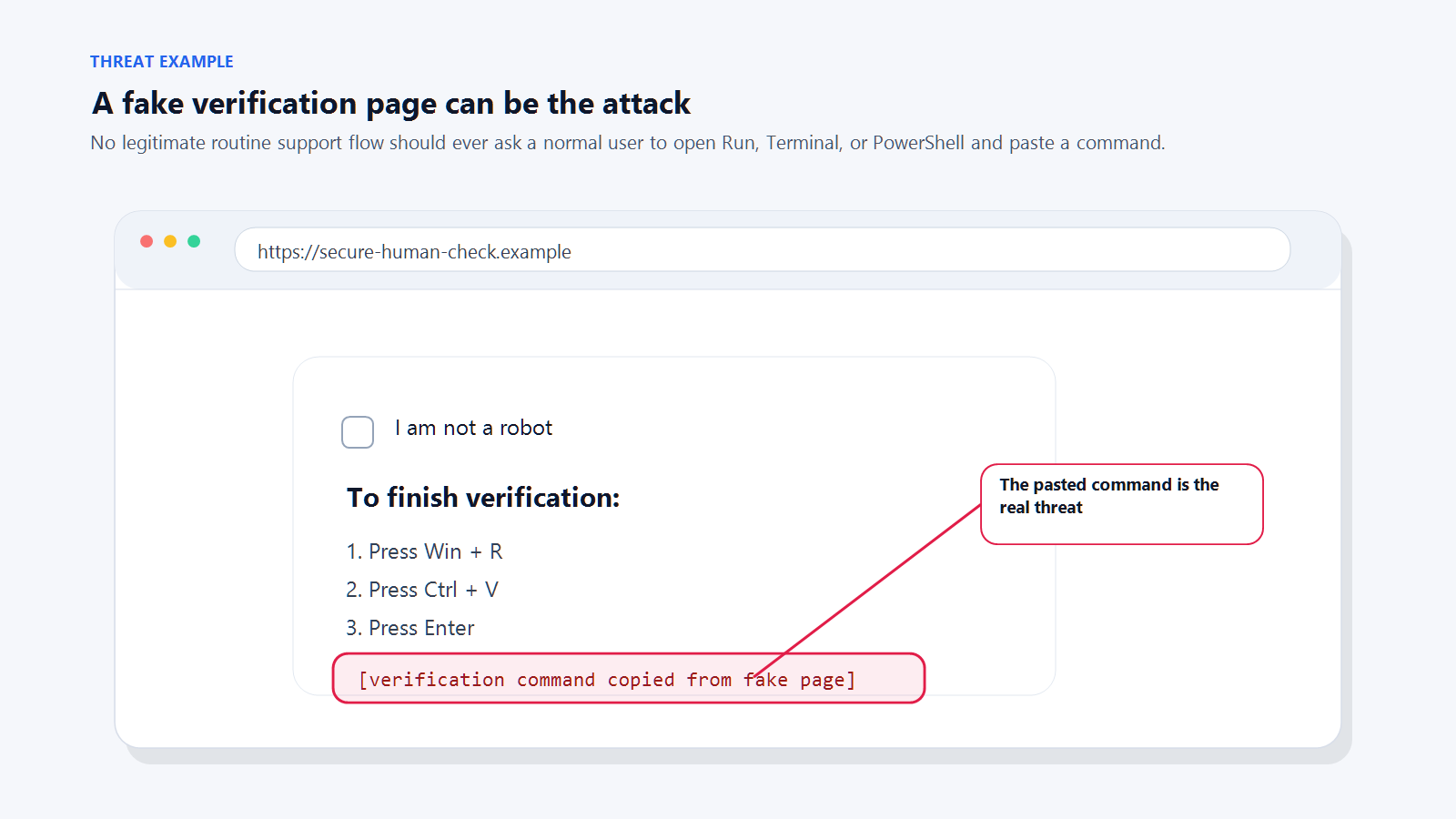
A classic ClickFix page. Legitimate services do not fix themselves by asking you to paste commands. Safe defaultNo legitimate company will ever ask an ordinary user to paste a command into a terminal to fix a routine problem. If a page is asking you to, close the tab. If you are worried an update is actually needed, go to the real settings or update screen on your device and check there.
-
Credential phishing (fake login pages)
Steal the password, step inside the account, launch everything else.
A credential phishing attack has one goal: get you to enter your username and password on a page that looks like a login screen but belongs to the attacker. Once they have that, they have your account.
How it worksYou receive an email, text, or message saying you need to review a document, verify your account, or check something urgent. The link takes you to a page that looks almost exactly like a real login screen for Microsoft 365, Google, your bank, or a payroll system. You log in. The attacker logs in next.
Why it costs so muchEmail account takeover is the launching pad for BEC. The attacker now sees every conversation in your mailbox. They learn who pays invoices, who approves transfers, how you phrase things, and what vendors you use. Then they send a fraudulent message from your own address. This is how the most expensive attacks on this list reach their targets.
SignalsYou clicked a link in a message and ended up on a login page. The URL does not match the real service. Small details are off: the page reloads oddly, asks for credentials a real login would not, or looks slightly different from the one you are used to.
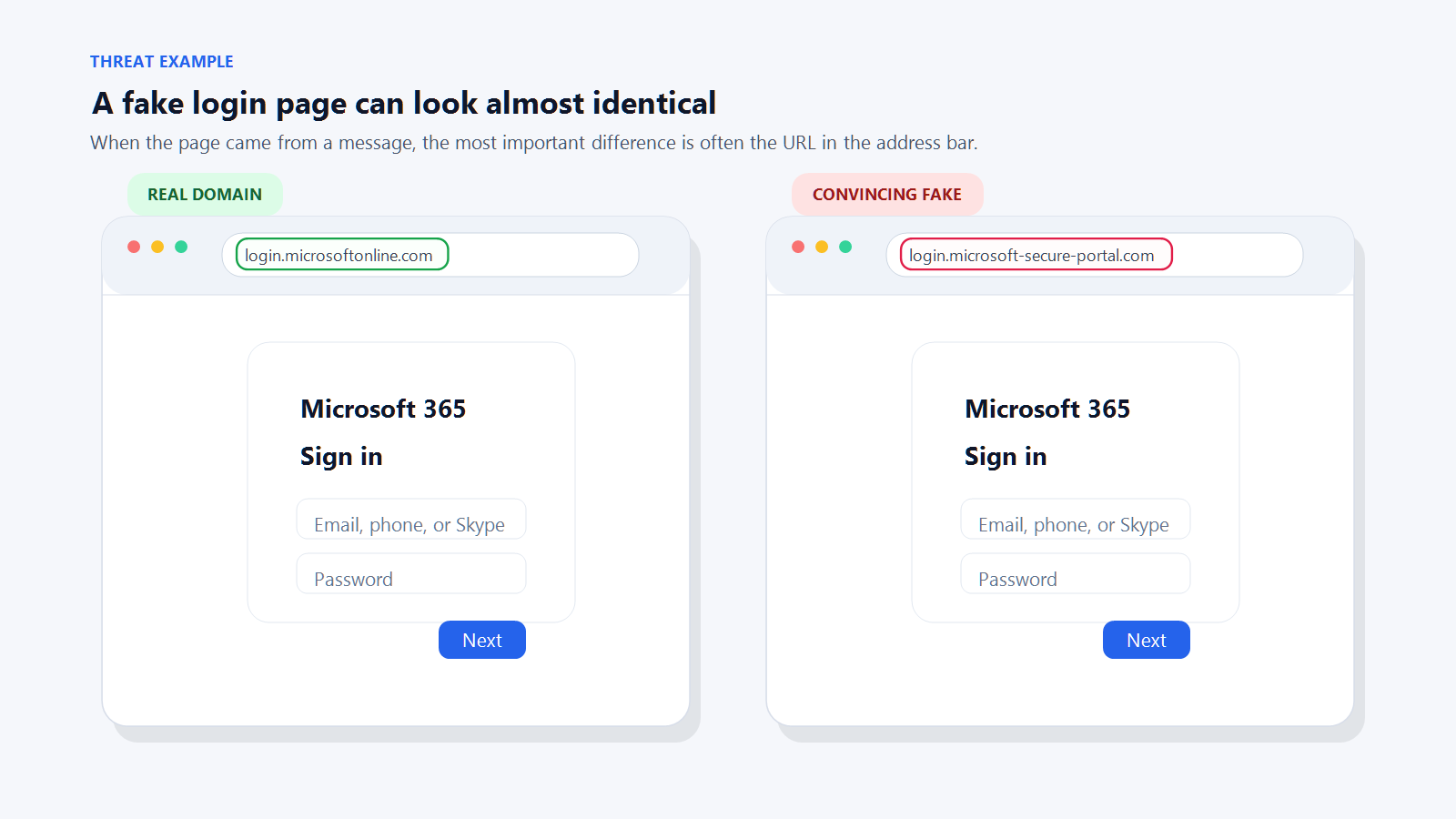
Real versus fake login page. The address bar is the only reliable tell. Safe defaultDo not log in from a link in a message. Navigate to the service yourself by typing the address or using a bookmark. If the page was real, it will still be there when you log in the normal way.
-
MFA fatigue / push bombing
An attack on the human holding the phone, not the system on the other end.
Multi-factor authentication is one of the strongest defenses available. MFA fatigue is an attack on the human operating it.
How it worksThe attacker already has your password, usually through credential phishing or a data breach. They try to log in. That triggers a push notification on your phone asking you to approve the login. You tap deny. They try again. And again. And again. Dozens of prompts, sometimes in the middle of the night, until you either tap "Approve" to make it stop or tap it by accident while half-awake.
What it looks likeIt is 11:30 on a Tuesday night. Your phone buzzes with a sign-in prompt. You tap Deny. Another prompt. Deny. Another. By the tenth one you are half-asleep, you tap Approve just to make the buzzing stop, and the attacker is now inside your account.
Why it costs so muchA successful MFA approval gives the attacker full access to your account. Everything that applies to credential phishing applies here: email takeover leads to BEC, data theft, and internal attacks.
SignalsYou are receiving approval prompts you did not trigger. The prompts come in rapid succession, at odd hours, or after you already denied one.
Safe defaultEvery MFA prompt is a question: "Did you just try to sign in?" If the answer is no, always deny. Never approve a prompt to make the noise stop. Treat repeated unprompted prompts as an active intrusion attempt:
- Deny every prompt.
- Change your password immediately on a trusted device.
- Review recent sign-in activity if the service offers it.
- Contact IT or the service provider if the account matters to your business.
-
AI-personalized spear phishing
A message that knows your name, your project, and the event you attended last week.
Generic phishing is mass-produced. It addresses "customer" and hopes someone bites. AI-personalized phishing, sometimes called spear phishing, is tailored: it uses your name, your employer, your role, a project you are working on, a conference you attended, a vendor you know, or a recent event on your LinkedIn.
How it worksAttackers feed public information about you into an AI tool and have it generate a message that reads as if a real colleague, partner, or contact wrote it. The message still ends in the same kinds of asks as any phishing: click a link, open a file, approve a request, move money, confirm credentials.
Why it costs so muchThe success rate is much higher than generic phishing. A message that cites your project by name and references your actual client is much harder to dismiss. The downstream impact is the same as any phishing: account takeover, BEC, data theft.
What it looks likeSubject: Quick question on the Edmonton office leaseHi Sarah, saw your LinkedIn post last week about the Edmonton expansion. Congrats. Our legal team flagged a conflict in the standard lease language that usually costs tenants money at signing. I've attached the redline we recommend. Can you look it over before your Thursday meeting?
Every specific detail (name, city, expansion, Thursday meeting) can be lifted from a public profile. The request at the end is the payload: open this attachment.
SignalsThe message uses real details, but those details are all things someone could find online. The request is still one of the classics: click, log in, pay, approve, confirm. A well-crafted message can pass every "tone feels off" test and still be fraudulent.
Safe defaultPersonalization is not proof. Evaluate the request, not the decoration. Would you expect this person to contact you this way about this topic? Verify through a different channel before acting.
-
Malicious attachments
A mature attack vector that still causes major damage when it gets through.
Attachments are a mature attack vector. Email security tools catch most of the obvious ones, so their share of incidents has dropped. The ones that get through still cause major damage, usually by installing ransomware or a password-stealer.
What it looks likeA reply arrives inside an existing thread from a vendor you actually use. "Please see the updated invoice attached, payment due Friday." The PDF opens, but the content is blurred and a banner tells you to click through to "verify your identity" before the document will display. That click is the attack.
Dangerous file typesExecutables (
.exe,.msi,.scr), scripts (.js,.vbs,.ps1), archive files that hide those types (.zip,.iso,.7z), and Office documents (.docx,.xlsx,.xlsm) that ask you to enable content or enable macros. PDFs are not automatically dangerous but are commonly used to carry phishing links or fake invoices.SignalsThe attachment was unexpected. The email urges you to open it quickly. The document asks you to enable macros or click "enable content" to see the real content. The file type does not match what the message describes.
Safe defaultDo not open attachments you were not expecting, even from senders you recognize. Email accounts get compromised routinely, and the attacker's first move is often to send malware to everyone in the contact list. If a file is not expected, confirm with the sender through a different channel before opening it. Never enable macros in a document you received by email.
-
Fake search ads and fake support pages
The top result for your bank or printer vendor is sometimes a scammer.
When you search for a company, software product, or support number, the top results are often ads. Scammers buy those ad slots to place convincing fake versions of real websites at the top of the page.
Common targetsBanking sites, printer support, software vendors (Microsoft, Adobe, antivirus products), shipping companies, government services.
How it worksYou search for "Scotiabank login." The top result is an ad that says "Scotiabank Online Login." You click, you land on a login page that looks real, you log in. The attacker captures your credentials. Or, you search for "HP printer support." The top ad says "Call HP Support: 1-800-XXX-XXXX." You call. A friendly scammer walks you through installing remote-access software, then either empties your bank account or demands a "support fee."
SignalsThe result is labeled "Sponsored" or "Ad." The URL in the ad is not exactly the real domain. The support phone number is unusual or asks for payment. The site asks you to install remote-access software.
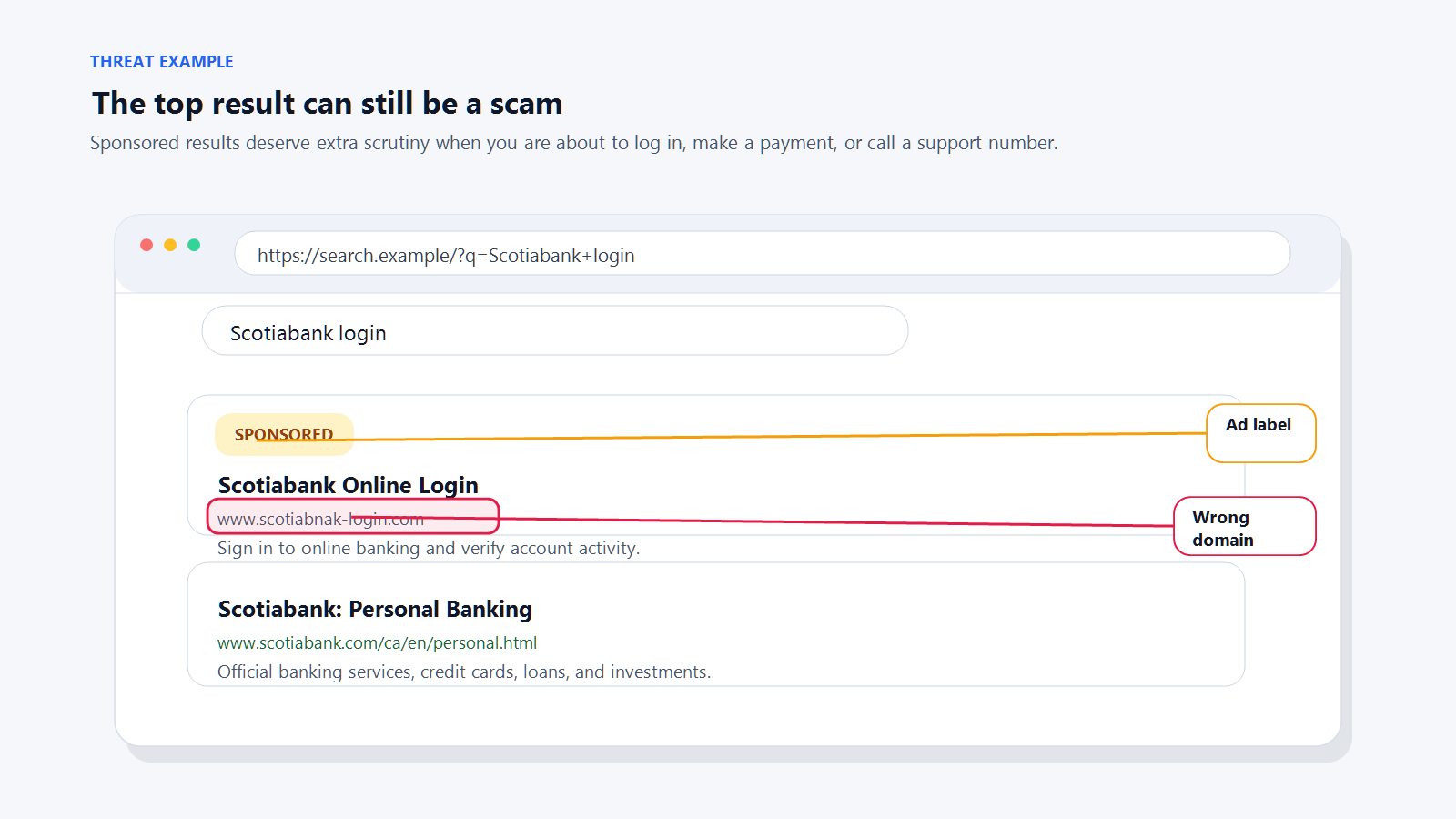
Sponsored slot above an organic result. Ad placement is easy to buy, even for impersonators. Safe defaultSkip sponsored results when you are going to log in, pay, or call for support. Type the address yourself, use a bookmark, or scroll past the ads to the real organic result. Verify any phone number against a trusted source like the back of your credit card or the organization's official app.
-
Fake browser warnings and tech-support popups
The alarm sound is the product. There is no virus.
A pop-up fills your browser. It plays an alarm sound. It says your computer is infected, all your files are at risk, and you must call a number immediately. Sometimes the pop-up locks the tab or plays audio on a loop.
How it worksThe page is HTML and JavaScript designed to look scary. There is no actual virus. If you call the number, a scammer walks you through installing remote-access software, "finds" imaginary problems, and charges you several hundred to several thousand dollars for a "cleanup." In some cases they also plant actual malware or drain accounts while they have remote access.
SignalsA pop-up tells you to call a phone number to fix a computer problem. Your browser suddenly goes full-screen. An alarm plays. The page claims to be from Microsoft, Apple, or your antivirus vendor.
Safe defaultMicrosoft, Apple, and your antivirus software will never ask you to call a phone number from a web page. Do not call the number. Do not click "X" inside the pop-up. Close the tab using the browser's own tab controls, or force-quit the browser if the page will not let go. If that does not work, restart the computer. If you are not sure the problem is gone, contact your IT provider.
-
QR code deception (Quishing)
A link you cannot read until you have already scanned it.
A QR code is a link you cannot read. That property is the entire reason scammers use them: the address cannot be previewed by glancing at it, and email security filters do not "see" inside the image.
Common patterns- A text message about a toll, delivery, or missed payment, with a QR code to "pay" or "reschedule."
- A sticker on a parking meter placed over the real payment QR code, directing you to a convincing-looking fake payment page.
- A printed handout, poster, or menu with a QR code leading to a login or payment page you did not expect.
SignalsThe QR code came with an urgent or unexpected message. The code is on a sticker that looks added after the fact. After scanning, the preview URL does not match the organization you expect.
Safe defaultBefore you act on a scanned code, look at the preview URL your phone shows. If it does not match the organization, close it. For payments, go directly to the organization's website or app rather than trusting a QR code.
-
Smishing (fraudulent text messages)
Phishing by SMS. Huge volume, smaller loss per incident.
Smishing is phishing delivered by text. The volume is enormous, but the attacks usually land at smaller amounts per incident than the threats above.
Specimen text"Canada Post: your parcel is on hold due to an address issue. Pay the $1.47 adjustment fee to reschedule delivery: bit.ly/canpost-resch"
Common themesMissed deliveries, toll violations, bank fraud alerts, tax or benefits messages, prize notifications, job offers. Usually combined with a short link and urgent language.
SignalsUnexpected. Short link. Urgent or threatening tone. From a number you do not recognize, or from an email address sent as an SMS. Asks you to tap a link, reply with information, or call a number.
Safe defaultDo not tap links in unexpected texts. If the message is about a real service you use, open the official app or type the website yourself. Forward suspicious texts to 7726 ("SPAM") in Canada and the US to help your carrier block the sender.


What to do if you already clicked, replied, ran, or paid
Mistakes happen. What matters next is speed.
-
If you clicked a suspicious link or visited a suspicious page
What needs to happen- The page needs to be closed right away.
- Nothing the page offered should be downloaded, installed, or opened. If something was already downloaded, it should be deleted without opening it.
- Note what happened next. Did the page ask you to log in, run a command, or install something? Each of those turns this into a bigger event, covered elsewhere in this section.
- If nothing else happened, the risk is lower, but the device should still be watched for unusual behavior over the next few days.
If this is a work device, or if the page asked you to run, install, or log in, call your IT department right away. A simple click is usually recoverable. The actions that often follow one are not.
-
If you entered a username or password
What needs to happen- The password needs to be changed immediately, and on a different device from the one where the credentials were entered.
- If that password is reused anywhere else, it needs to be changed in those places too.
- All other active sign-in sessions on the account need to be signed out.
- Any new mailbox forwarding rules, inbox rules, or connected apps on the account need to be reviewed and removed if unfamiliar. Attackers often set up a silent forward so they can keep reading mail even after the password is changed.
- The account's MFA methods need to be reviewed. Attackers often add their own phone number or authenticator app as a second factor so they can sign back in later.
- If MFA is not already enabled, it needs to be turned on now.
If this is a work account, call your IT department right away. Several of those checks need admin access, and the longer a compromised account sits, the more damage an attacker can do from it, including sending fraudulent messages from your address.
-
If you approved an MFA prompt you did not initiate
What needs to happen- The password on that account needs to be changed immediately, on a different device from the one where the prompt was approved.
- Recent sign-in activity on the account needs to be reviewed. Most major services (Microsoft 365, Google, banks) offer a "recent activity" or "sign-in history" view. Anything unfamiliar should be treated as an active intrusion.
- All other active sign-in sessions on the account need to be signed out.
- The account's MFA methods need to be reviewed and any unfamiliar ones removed. Attackers sometimes add their own phone number or authenticator app as a second factor while they have access.
- Any forwarding rules, inbox rules, or connected apps added recently need to be reviewed and removed if unfamiliar.
If this is a work account, call your IT department right away. An approved MFA prompt you did not trigger almost always means the attacker is already inside. Speed matters here more than for almost any other scenario on this list.
-
If you ran a command or installed something at a page's direction
What needs to happen- The device should be disconnected from the network immediately if you can do so safely. Unplug the network cable, turn off Wi-Fi, or put it in airplane mode.
- Stop using the device. Do not log into other accounts, check email, or open files. Anything typed or viewed may be visible to the attacker.
- Passwords saved on the device, or used on it after the paste, should be treated as compromised. They need to be changed from a different, known-good device.
- The device itself needs to be inspected, cleaned, or re-imaged by IT before it returns to normal use. A well-crafted piece of malware can persist through a restart.
If this is a work device, call your IT department right away. This is a higher-risk event than a simple mistaken click. The pasted command is often the first step of a ransomware attack, and the window to contain it is measured in hours.
-
If you sent money or shared financial information
What needs to happen- Your bank or card provider needs to be called immediately. Not email, not chat. Call the fraud department directly. Acting within the first few hours gives them the best chance of stopping or reversing a transaction.
- Any card numbers, account numbers, or banking credentials that were shared need to be treated as compromised. Your bank will advise on cancelling or reissuing.
- The incident should be reported to the Canadian Anti-Fraud Centre at antifraudcentre-centreantifraude.ca, or your country's equivalent. Reports feed active investigations and help protect other businesses.
- If the payment was a wire transfer, ask your bank specifically about a wire recall. It is not always possible, but it is the fastest path back when it is.
If this is a business payment, call your finance lead immediately and loop in your IT department at the same time. For Business Email Compromise incidents, the window to freeze or reverse a wire is often measured in hours. IT needs to check whether an email account was compromised as the entry point.
-
If your business is involved and you are not sure what happened
What needs to happen- Call your IT provider or internal IT team with a brief summary: what the message or page asked for, what you did or did not do, and when it happened. A plain timeline matters more than a technical description.
- When in doubt, treat it as real. A false alarm takes a few minutes to rule out. Missing an actual incident can cost a small business tens of thousands of dollars and weeks of recovery work.
When to ask for help
You do not have to carry this alone.
If your business has an IT provider or an internal IT team, use them. A forwarded suspicious email takes seconds on your end and saves everyone a lot of grief. They would rather review ten false alarms than miss one real attack.
If you are not sure your current support setup covers this kind of risk, talk to us. Helping small businesses reduce exposure to phishing, fake websites, account compromise, and scam-driven fraud is part of what we do every day.
Sources and further reading
The organizations and reports below publish current data, trends, and reporting channels for the threats covered in this guide.
- FBI Internet Crime Complaint Center (IC3). Annual report on reported cybercrime, including Business Email Compromise losses. ic3.gov
- Verizon Data Breach Investigations Report (DBIR). Annual breakdown of how breaches actually happen. verizon.com/dbir
- Canadian Anti-Fraud Centre. Canadian fraud-reporting hub with current scam trends. antifraudcentre-centreantifraude.ca
- Microsoft Threat Intelligence and CISA advisories. Ongoing reporting on emerging techniques including ClickFix, MFA fatigue, and AI-personalized phishing.
The short version
Modern scams are often polished. Many are personalized. A few are frighteningly convincing.
What they still have in common is how they arrive and what they ask. Unexpected. Urgent. Asking you to click, run, pay, log in, install, or approve something. Trying to bypass the way you normally verify things.
The people who avoid these attacks are usually not the most technical. They are the ones who pause, check the real address, ignore the pressure, and verify through a channel they trust.
If it is a surprise and it is asking you to click, run, pay, or approve something, treat that as the warning sign. Slow down and verify first.
Worried a message in your inbox right now might be a scam?
A two-minute second opinion from Treo is often the cheapest way to rule it out. We help small businesses in Edmonton and beyond reduce exposure to phishing, account compromise, and scam-driven fraud.
Talk to an expert